¶ 1. Dashlet Types
This page lists all available dashlets that you can add to a dashboard. Each dashlet serves a specific purpose, such as showing data, enabling quick actions, or supporting interaction. Below is a short description of each dashlet type:
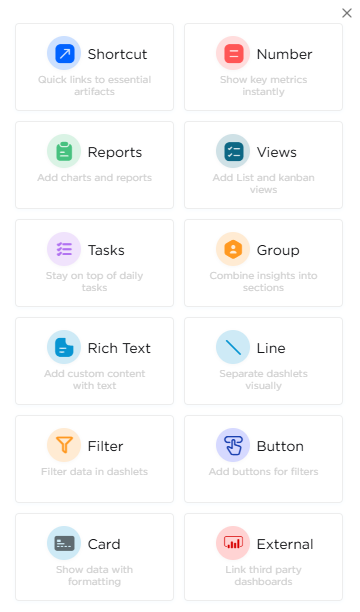
| # | Dashlet Type | Description |
|---|---|---|
| 1 | Shortcut | Adds quick links to apps, list screens, reports, or dashboards for faster access. |
| 2 | Number | Shows a single numerical value like counts, totals, or aggregated results. |
| 3 | Reports | Displays report data, including tabular or chart-based reports, with filter support when enabled. |
| 4 | Views | Shows app records in List or Kanban format, helping users track and manage data from the dashboard. |
| 5 | Tasks | Shows assigned tasks, including personal tasks, team tasks, or grouped tasks. |
| 6 | Group | Used to structure and group multiple dashlets visually into sections. |
| 7 | Rich Text | Use the RTE dashlet to add formatted text, images, and HTML on the dashboard for custom messages and branding. |
| 8 | Line | Adds visual spacing or separation between dashlets to organize layout. |
| 9 | Filter | Enables filtering dashboard content based on parameters. |
| 10 | Button | Adds a control button that works with filters to submit, reset, or apply filter results on the dashboard. |
| 11 | Card | Displays summarized data with formatting options. |
| 12 | External | Allows embedding external dashboards or third-party visual content. |