For the Immunization Tracking System, the eVaccination Performance & Monitoring Dashboard is created to provide healthcare workers with centralized visibility into child registration, vaccination activities, healthcare risks, and immunization monitoring.
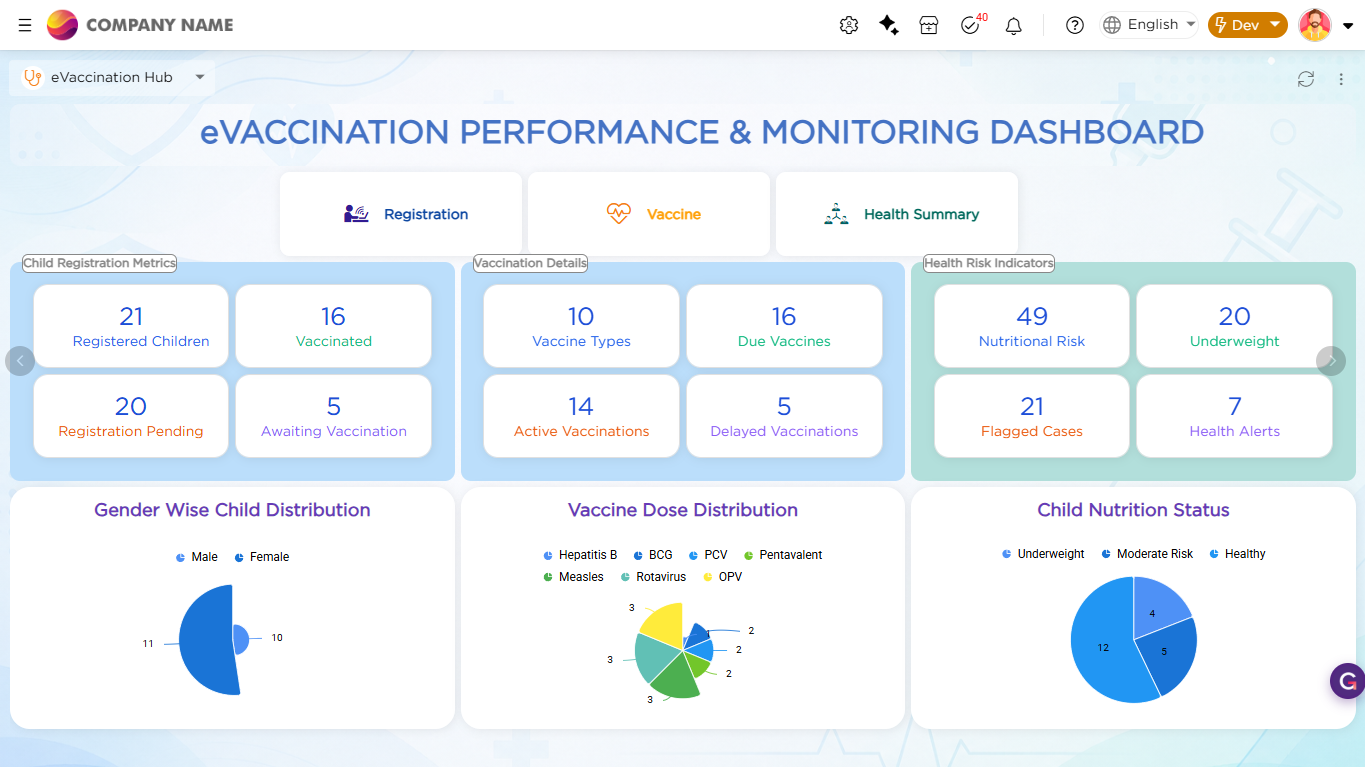
The dashboard combines registration metrics, vaccination monitoring, healthcare risk indicators, and analytical charts into a single centralized interface. This helps healthcare workers quickly monitor healthcare activities and identify priority cases without navigating across multiple screens.
To build the dashboard, multiple dashlet types are used to organize healthcare information in a visually structured format.
| Dashlet Type | Purpose |
|---|---|
| Rich Text Dashlet | Displays the formatted dashboard title and section headings |
| Shortcut Dashlets | Provides quick access to Registration, Health Summary, and Vaccination modules |
| Grouping Dashlets | Organizes related healthcare information into separate sections |
| Number Dashlets | Displays healthcare counts and vaccination metrics inside grouped sections |
| Report Dashlets | Displays analytical charts and monitoring insights |
To learn more about dashboard capabilities and dashlet configurations used in this implementation, refer to the Dashboard article.
Refer to the GIF below for a better understanding of the Dashboard operations: