Quick Flows are predefined actions that are automatically triggered after a record is submitted in an app. They help streamline business processes by eliminating manual follow-up actions and directing users to the next step in a workflow.
For example, after submitting an employee record, a Quick Flow can open another app to capture additional information, display submitted data in a report or generate a printable document. This helps create a seamless user experience and improves process efficiency.
¶ 1. Types of Quick Flows
Quick Flows support the following actions after record submission:
| Quick Flow Type | Description |
|---|---|
| Add Record in a New App | Opens another app in Add Record mode after record submission, allowing data to be shared between apps. |
| Open App as Report | Opens another app in read-only mode and displays submitted data as a report. |
| Open Kanban View | Displays records in a Kanban-style layout for easier tracking and visualization. |
| Open List View | Displays records in a structured list format for easy navigation. |
| Print App Report | Generates and prints an app report containing submitted data. |
| Print Label/Receipt | Generates and prints labels or receipts based on submitted records. For configuring Print Label/Receipt, refer to Label Printing for detailed steps. |
| Print Report | Generates and prints a report using submitted record data. |
¶ 2. How to Create Quick Flows
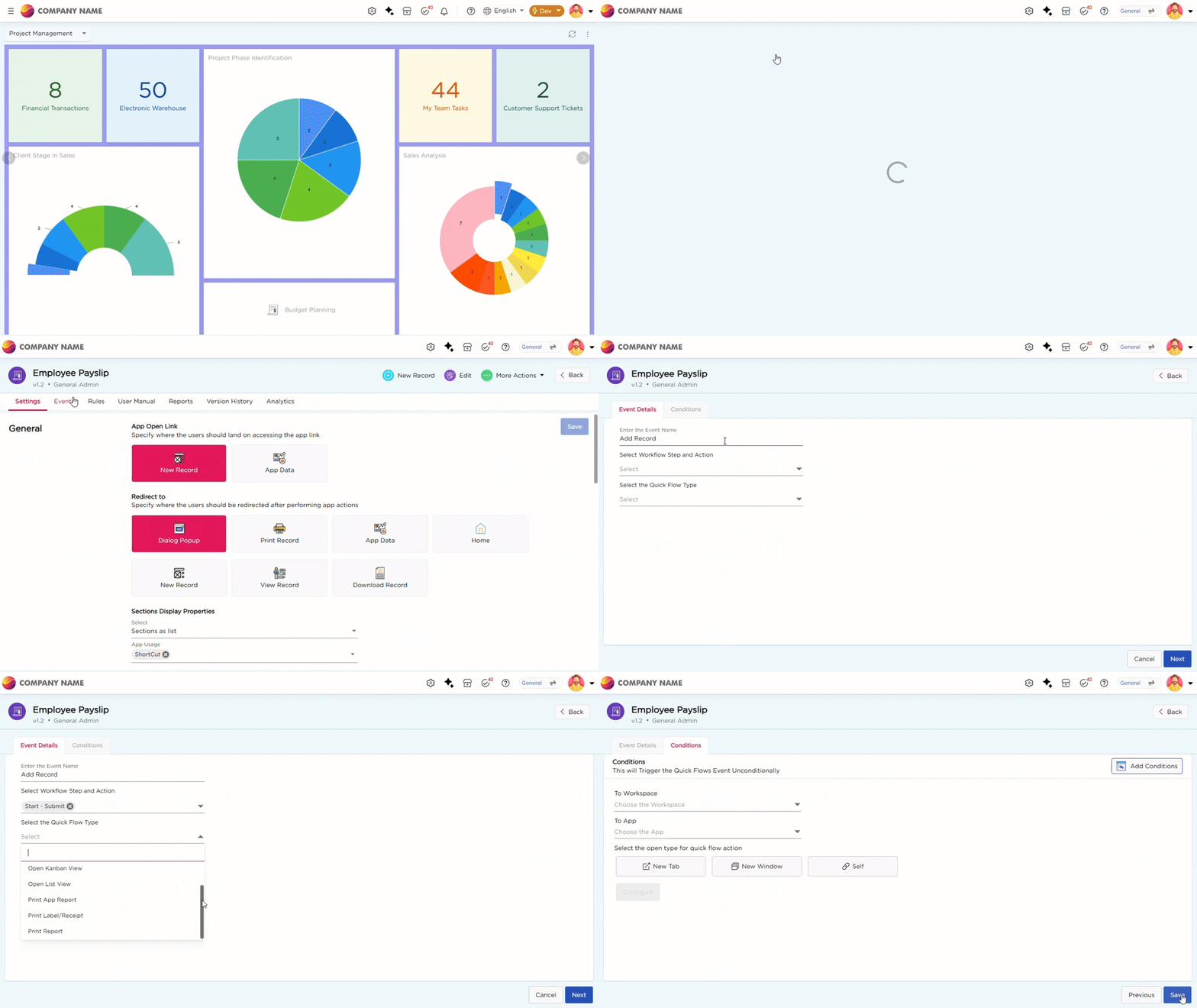
Follow these steps to set up Quick Flows in app:
- Navigate to Admin Menu → Apps → Manage Apps.
- Select the application where you want to configure Quick Flows.
- Click Events → Quick Flows.
- Select +Add button to create a new Quick Flow.
- Enter a name for the Quick Flow.
- Select Workflow Step and Workflow Step Action from which the Quick Flow should be triggered.
- Select the required Quick Flow Type from the dropdown list.
- Click Next to proceed to the Conditions tab.
Note
Configuration steps vary based on the selected Quick Flow type. Click the required Quick Flow type in the table above to view its configuration procedure.