The Sprint Management module captures sprint information, tracks sprint progress, and manages the sprint through its lifecycle. The Sprint Details form records sprint planning and progress information, while the workflow moves the sprint through Planned, Active, Completed, and Spillover stages.
¶ 1. Create Sprint
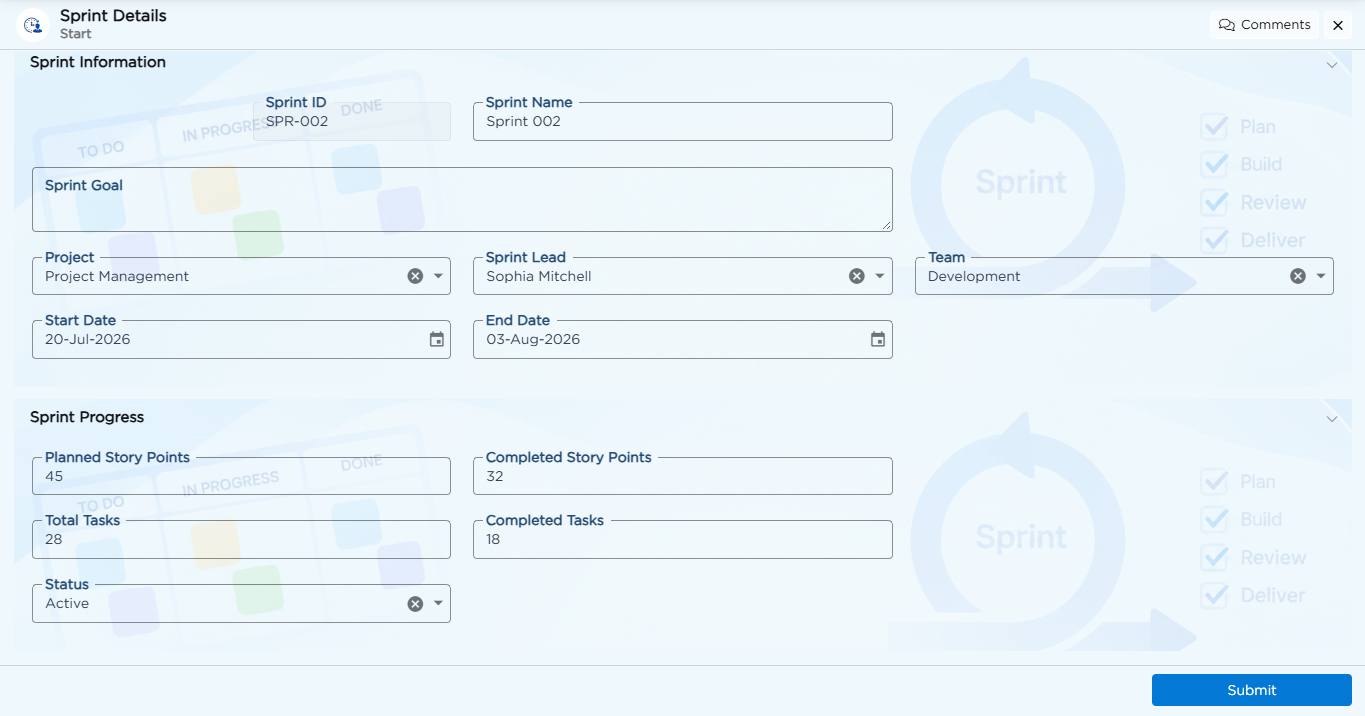
The Sprint Details form captures the following information:
| Field Name | Field Type |
|---|---|
| Sprint ID | Auto-Generate |
| Sprint Name | Text |
| Sprint Goal | Text Area |
| Project | Dropdown |
| Sprint Lead | Dropdown |
| Team | Dropdown |
| Start Date | Date |
| End Date | Date |
| Planned Story Points | Number |
| Completed Story Points | Number |
| Total Tasks | Number |
| Completed Tasks | Number |
| Status | Dropdown |
To understand how individual form elements and configurations work, refer to the Form Builder article.
¶ 2. Workflow
The Sprint Management workflow moves a sprint through review, activation, completion, and spillover handling.
| Workflow Step | Description |
|---|---|
| Submit | Submits the Sprint Details form for review. |
| Sprint Review | Manager reviews the sprint information and confirms whether it is ready to be planned. |
| Planned | The sprint is approved and scheduled but has not started. |
| Sprint Activation | Operations Manager reviews the scheduled sprint and activates it when work is ready to begin. |
| Active | The sprint is in progress and its work is tracked. |
| Sprint Completion Review | Reporting Manager reviews the completed story points and tasks and determines whether the sprint is completed or requires spillover. |
| Completed | The sprint is completed and its final output is available for reporting. |
| Spillover | The sprint contains unfinished work and requires further review. |
| Spillover Review | Operations Manager reviews the remaining work and either moves the sprint back to Active or closes it as Completed. |
Refer to the Workflow article for details on configuring these stages.
¶ 3. Business Rules
| Rule Name | Purpose |
| Date Range Validation | Prevents End Date from being set before Start Date |
| Overlap Check | Flags a new sprint when its dates overlap an existing Planned or Active sprint |
Refer to the Business Rules article for details on configuring these rules.