The Retail Promotion Dashboard provides Head Office buyers with a centralized view of promotion planning, demand, stock, and allocation activities. It helps buyers monitor required and allocated quantities, identify allocation gaps, review available stock and recent sales, and analyze promotion trends by type, brand, flyer, and allocation remarks from a single screen.
To build the dashboard, multiple dashlet types are used to organize retail promotion information in a visually structured format.
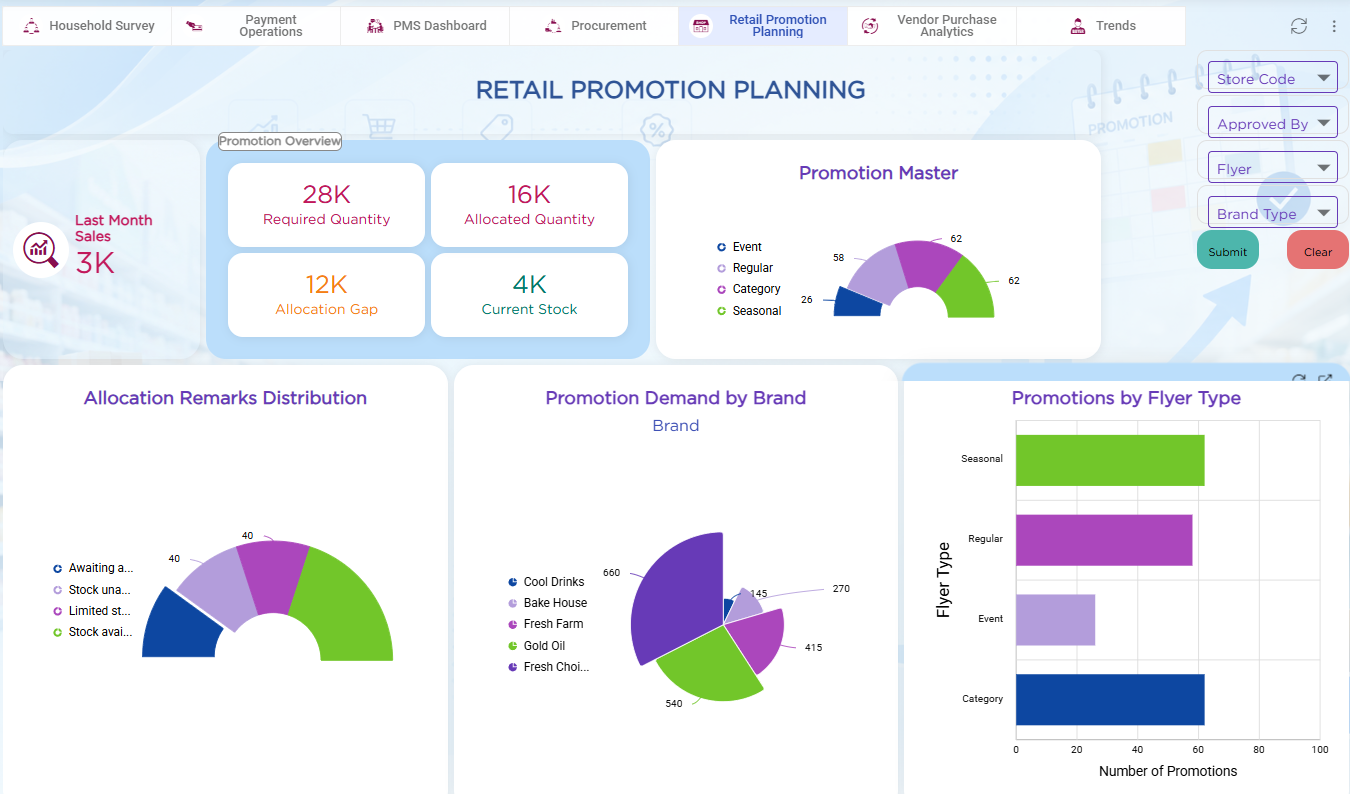
| Dashlet Type | Purpose |
|---|---|
| Rich Text Dashlet | Displays the Retail Promotion Planning dashboard title and provides a clear heading for the dashboard. |
| Grouping Dashlet | Groups the key promotion metrics under the Promotion Overview section. |
| Number Dashlets | Displays Last Month Sales, Required Quantity, Allocated Quantity, Allocation Gap, and Current Stock. |
| Report Dashlets | Displays Promotion Master, Allocation Remarks Distribution, Promotion Demand by Brand, and Promotions by Flyer Type for visual analysis of promotion data. |
| Filter Dashlets | Enables users to filter dashboard information by Store Code, Approved By, Flyer, and Brand Type. |
| Button Dashlets | Provides Submit and Clear actions to apply or reset the selected filter values. |
Refer to the Dashboard article for details on adding and configuring dashlets.