Deploying moves the artifacts you select from the Dev stage to the Live stage. After you deploy, the artifacts are available in Live for real-time use, transactions, and reporting.
Not everything you build in Dev needs to be deployed. Only specific artifacts must be deployed so that they are available for actual use in Live. This lets you test changes safely before end users see them.
¶ 1. Where Deployment Is Done
Deployment is done from the Artifact Summary page in the Dev stage. From this page, you can:
- View all artifacts created or modified in Dev
- Select only the artifacts you need
- Deploy them to the Live stage
¶ 1.1. How to Deploy Artifacts
- Switch to the Dev stage.
- Click the branch name (General) at the top right of any Admin Menu page to open the Artifact Summary.
- Select the artifacts you want to deploy. To find them, use the category drop-down, the search box, or the filters.
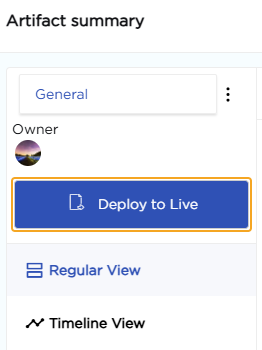
- Click Deploy to Live.
- Open Deployment Log to check the deployment. The latest deployment is marked Active.
The first image shows the branch name (step 2). The second shows the Deploy to Live button in the Artifact Summary (step 4).

Note
Deploy related artifacts together, or deploy the parent artifact first. For example, deploy a report's data source before the report. See Artifact dependencies.
¶ 1.2. What Happens After Deployment
After you deploy:
- The artifacts are available in the Live stage.
- End users can access and use them.
- The Dev artifacts stay editable without affecting Live.

¶ 2. Artifacts You Can Deploy
Not every configuration on the platform needs to be deployed. Only the artifacts listed below must be deployed explicitly for their changes to appear in the Live stage. Artifacts that are not deployed remain available only in the Dev stage.
The Artifact Summary groups these artifacts into the following categories.
| Agents | Global Filter | Reports |
| App Events | Lookups | Role |
| App Reports | Organization Themes | Scheduler Notifications |
| Apps | Payment Gateways | Service Events |
| Custom Menu | Public Dashboards | Services |
| Data Sources | References | Tabbed Views |
| Data Tables | Report Scheduler | Toaster Configurations |
| DataSource AddOns | Digital Signature | User Manuals |
| DataTable Functions | Document Repository | Views |
| DataTable Syncs | External App References | Workspaces |
| External Connection | External Lookups |