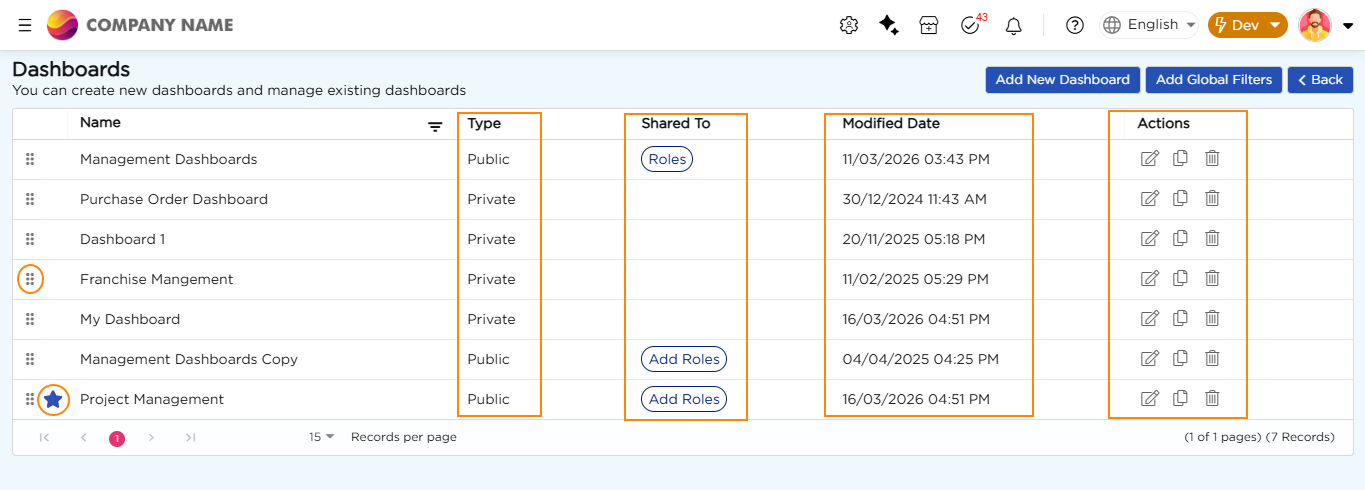
The Manage Dashboards page is where you manage all dashboards in your workspace. It shows a list of dashboards and lets you create new dashboards, edit or delete existing ones, manage access for public dashboards, and reorder dashboards so important ones are easy to find. You can also set a default dashboard that opens when users log in. The following image shows the Manage Dashboards page with options to organize dashboards, share access, and perform dashboard utilities.
¶ 1. Organize Dashboard
You can organize dashboards directly from the Manage Dashboards page.
To set a default dashboard, select the star icon next to a dashboard in the list. The selected dashboard becomes the default immediately, and any previously set default is removed automatically. This default dashboard opens when users log in.
You can also change the order of dashboards by dragging them to a new position in the list. This helps keep frequently used or important dashboards at the top for easy access.
¶ 2. Share Access to Public Dashboards
Public dashboards can be shared with specific roles.
In the Shared To column, select Roles to view the roles that already have access to the dashboard. Select Add Roles to assign access to additional roles.
When assigning or updating roles:
- Select the roles that should have access to the dashboard.
- Select the workspace where the dashboard should be available.
- Select the stage, Live or Dev, where the dashboard should be visible.
- Save the changes to apply the access settings.
This ensures that only the intended users can view or use the dashboard.
¶ 3. Dashboard Utilities
The Manage Dashboards page also provides utility options for each dashboard.
Each dashboard shows a Last Updated timestamp, which helps you track recent changes.
Action controls are available for every dashboard, allowing you to:
- Edit the dashboard.
- Clone the dashboard to create a copy.
- Delete the dashboard when it is no longer needed.
You can also use the Add New Dashboard option to create a new dashboard. This opens the dashboard configuration canvas, where you can start building the dashboard.