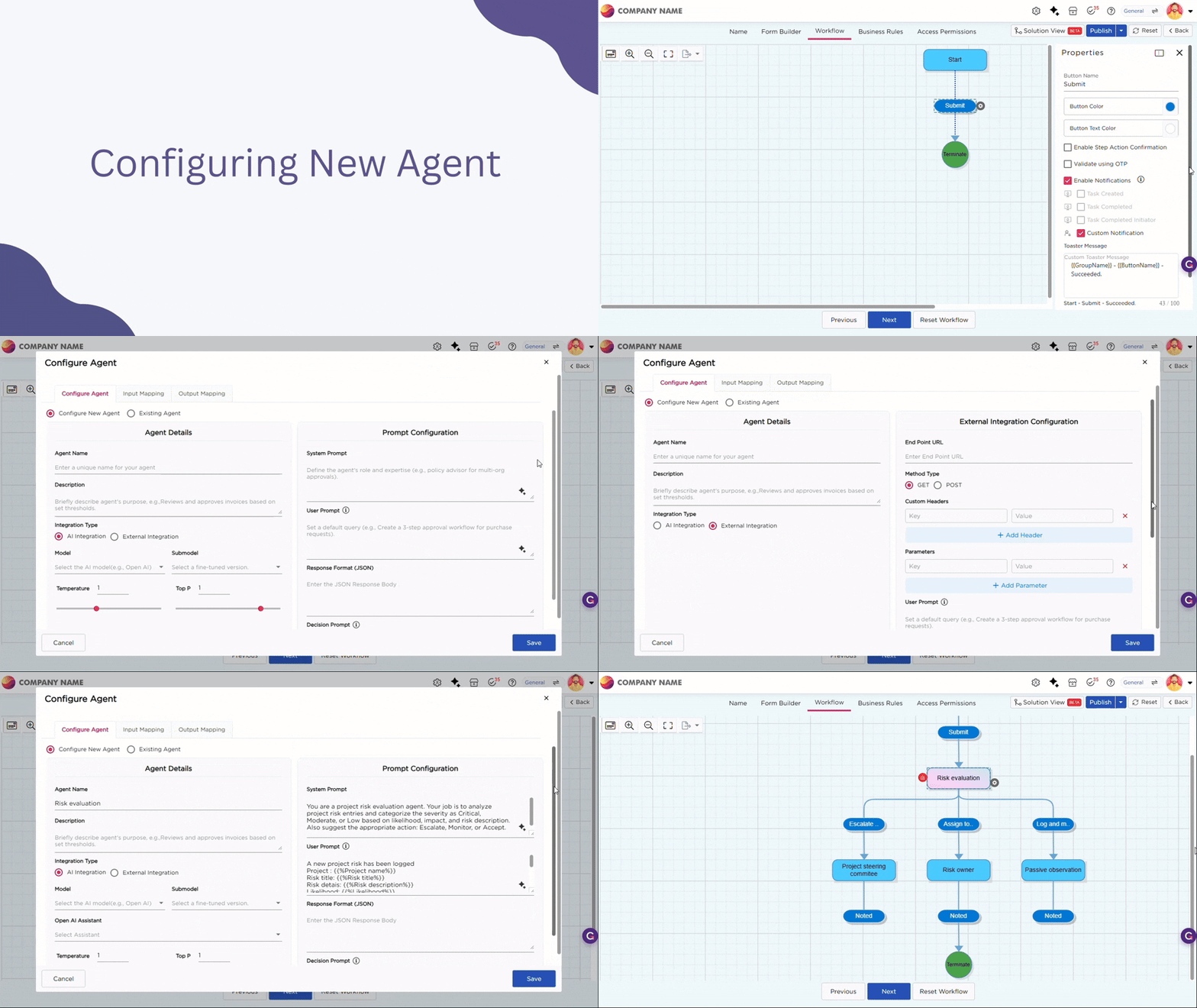
In workflows, some steps require decisions based on multiple inputs or exceptions. Managing these decisions using only fixed conditions can lead to complex and hard-to-maintain workflows.
AI Agents help address this by evaluating data at runtime and determining how the workflow should proceed, reducing complex branching while keeping workflow behavior consistent.
¶ 1. Configure AI Agent in Workflow
- Navigate to the Workflow Builder of an application. You will see a default first step, usually the Form Submission step. This is where the process begins.
- Click the Step Action button and select Create Agent Step.
- An Agent step is added to the workflow and appears as Agent 1 on the workflow builder.
- Click Agent 1 in the workflow. The Configure Agent screen opens with the following tabs:
- Configure Agent
- Input Mapping
- Output Mapping
- In the Configure Agent tab, you can either create a new agent or use an existing agent.
- Select Configure New Agent to create a new agent for this workflow.
When you select the Configure New Agent option, the following configuration fields become available. These fields are used to define how the agent evaluates data and returns a decision during workflow execution.
¶ 1.1. Agent Configuration Fields
| Field | Description |
|---|---|
| Agent Name | Enter a unique name to identify the agent. |
| Description | Briefly describe the purpose of the agent. |
| Integration Type | Select AI Integration or External Integration based on how the agent evaluates data. |
| Model | Select the AI model to be used for evaluation. |
| Submodel | Optional. Leave unchanged unless instructed by your administrator. |
| Temperature | Controls how consistent or varied the agent’s responses are. |
| Top P | Controls the probability range used for generating responses. |
If External Integration is selected, the agent evaluates data by invoking an external API instead of using an AI model.
| Field | Description |
|---|---|
| End Point URL | Enter the API endpoint that processes the request. |
| Method Type | Select GET or POST based on the API requirement. |
| Custom Headers | Add required headers such as authorization tokens or content type. |
| Parameters | Define key value pairs passed to the external service. |
| User Prompt | Define the request payload sent to the external system. You can include dynamic application values. |
| Response Format (JSON) | Define the expected JSON response structure returned by the service. |
| Decision Prompt | Specify how the response should be evaluated to determine the next workflow step. |
¶ 1.2. Prompt Configuration Fields
| Field | Description |
|---|---|
| System Prompt | Defines the role and responsibility of the agent. |
| User Prompt | Defines the default instruction given to the agent. |
| Response Format (JSON) | Specifies the expected response structure. |
| Decision Prompt | Defines how the agent evaluates input data and makes decisions. |
Click Save to create and attach the agent to the workflow.