Assigning a user to a role ensures they receive the appropriate access, responsibilities, and permissions required to participate in applications and automated processes within a workspace. Roles act as permission sets, and users inherit all capabilities defined within the roles assigned to them.
Proper role assignment allows users to contribute to a process, perform stage-specific actions, and access the right workspaces in an organized and controlled manner.
¶ 1. Follow the step below to Assign User a Role.
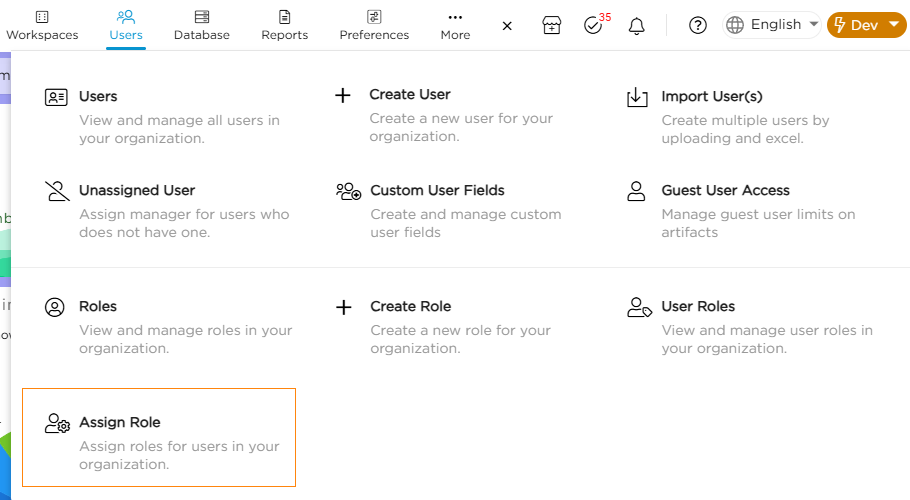
1. Go to Admin Menu → Users → Assign Role.
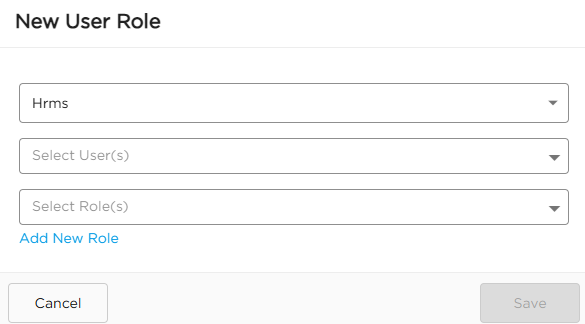
2. Select the Workspace where the user shall contribute to a process.
3. Select the respective User(s).
4. Select the right Role(s).
5. Click Save.
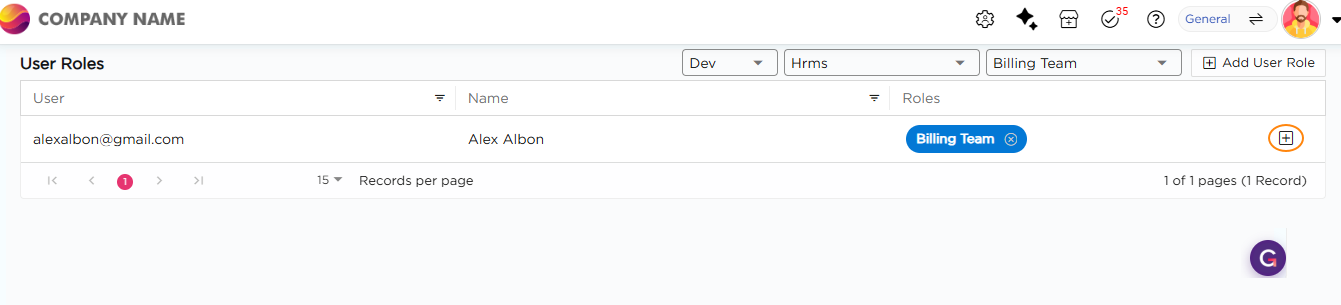
6. The respective User will be assigned with the right Role.
7. To assign more roles to a user, click on “+” and assign additional role(s).
Note
Sandbox in Quixy is the environment where citizen developers build, test, and deploy solutions. It can have two stages—Dev and Live—or four stages—Dev, QA, UAT, and Live.