Single Sign-On (SSO) is an authentication method that allows users to sign in once and access multiple applications without logging in again.
In Quixy, SSO enables users to log in using their existing credentials from an external identity system such as Azure, Okta, Auth0, Google, Active Directory, or LDAP. Users authenticate through their Identity Provider, and Quixy trusts that authentication to grant access. Separate Quixy login credentials are not required.
SSO improves security and simplifies access by reducing password usage and login friction for users.
¶ 1. How Single Sign-On Works
SSO works by establishing trust between:
- Identity Provider (IdP) – The system that authenticates the user (e.g., Azure, Okta, Google).
- Service Provider (SP) – The application the user wants to access (Quixy).
This trust is established using certificates and token-based communication. When a user attempts to log in, the Service Provider relies on the Identity Provider to verify the user’s identity and pass back a secure authentication token.
¶ 1.1. Typical SSO Login Flow
- User accesses Quixy (Service Provider).
- Quixy sends an authentication request to the selected Identity Provider.
- If the user is not authenticated, the IdP prompts them to log in.
- After successful login, the IdP generates a secure token containing verified user identity details.
- The token is passed back to Quixy via the user’s browser.
- Quixy validates the token based on the trust configuration.
- The user is granted access without entering credentials again.
- This process ensures secure, efficient, and consistent authentication across systems.
¶ 2. Configuring Single Sign-On
Quixy allows organizations to configure multiple SSO providers simultaneously. This is especially useful for companies with diverse authentication requirements across departments, subsidiaries, or regions.
Examples of Multi-SSO Usage:
- A parent company uses Azure AD
- Subsidiaries use Okta or Google
- Internal teams rely on LDAP or Active Directory
Each user can be mapped to the appropriate SSO provider based on their department, role, or organizational structure.
¶ 3. Steps to Configure SSO
- Go to Admin Menu → Preferences → Security & Privacy.

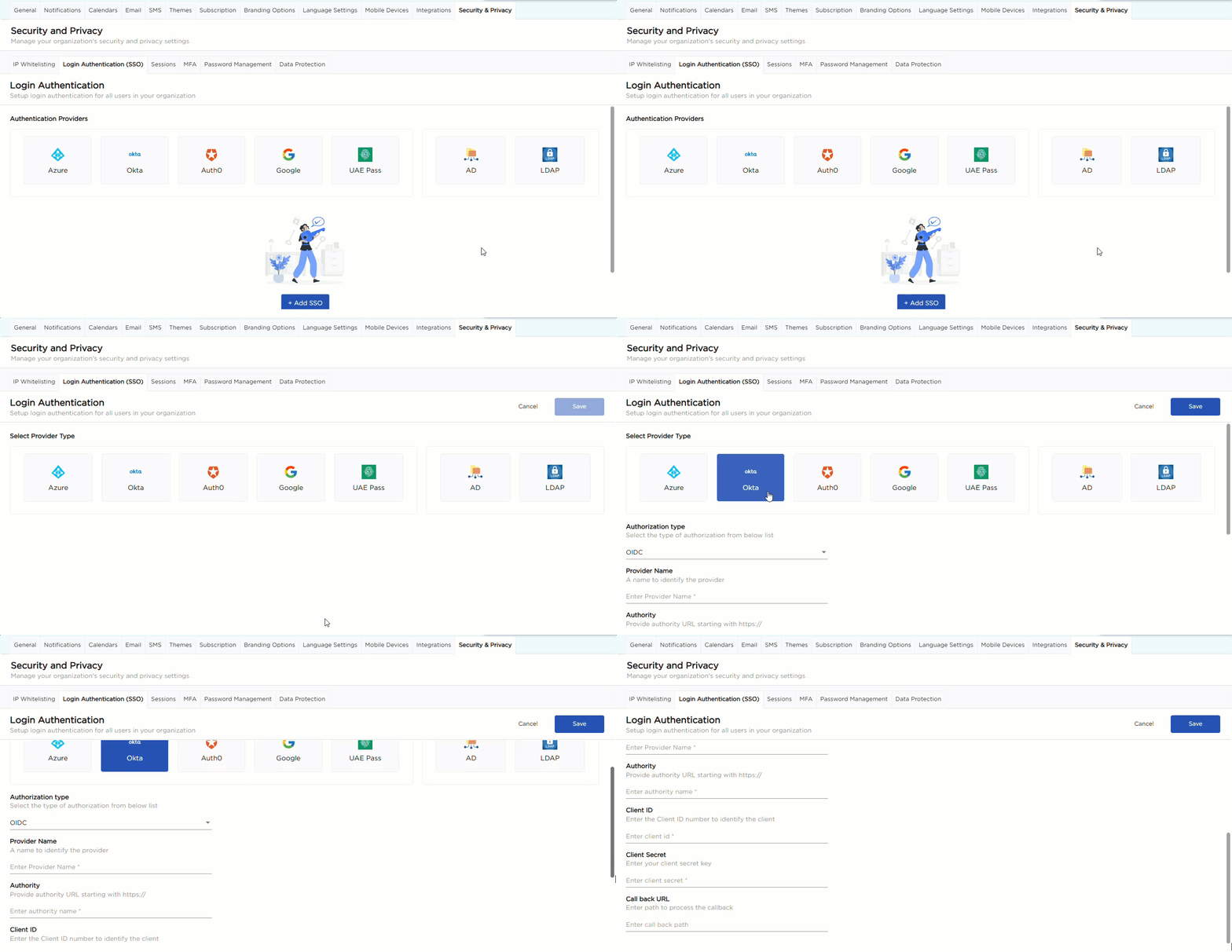
2. Navigate to the Login Authentication (SSO) tab and click + Add SSO.
3. On the SSO configuration page, select your identity provider from the available options:
- Azure
- Okta
- Auth0
- Active Directory (AD)
- LDAP
5. Once a provider is selected, the corresponding configuration fields are displayed.
6. From the Authorization type dropdown, select the required protocol:
- OIDC (OpenID Connect)
- SAML (Security Assertion Markup Language)
7. Fill in the required configuration fields.
8. Each field includes help text explaining what information to provide:
- Provider Name: A user-friendly name to identify the SSO provider inside Quixy. This helps administrators recognize which configuration corresponds to which IdP—especially useful when multiple SSOs are configured.
- Authority: The base authorization URL of your Identity Provider. This URL must begin with
https://. Quixy uses this URL to redirect authentication requests to the IdP. It defines the issuer for login flows. - Metadata Address: The metadata URL of the Identity Provider.
- For Example: Azure AD (SAML):
https://login.microsoftonline.com/{tenant_id}/federationmetadata/2007-06/federationmetadata.xml
- For Example: Azure AD (SAML):
- Client ID: A unique identifier assigned to your application when you register it in the Identity Provider.
- Callback URL: The path/URL where the Identity Provider redirects the user after authentication.
9. Save the configuration to enable the selected SSO provider.
Note
While enabling or disabling SSO, avoid altering the existing configuration details. You can simply toggle the provider "ON" or “OFF” as needed.
¶ 4. AD and LDAP as SSO Providers
Quixy also supports Active Directory (AD) and Lightweight Directory Access Protocol (LDAP) as independent SSO options.
¶ 4.1. Why AD/LDAP?
- Ideal for large organizations with hierarchical structures
- Centralized management of user accounts and permissions
- Meets industry compliance standards requiring strict access controls
- Admins can configure AD/LDAP directly through the UI—no backend support required.
.gif)