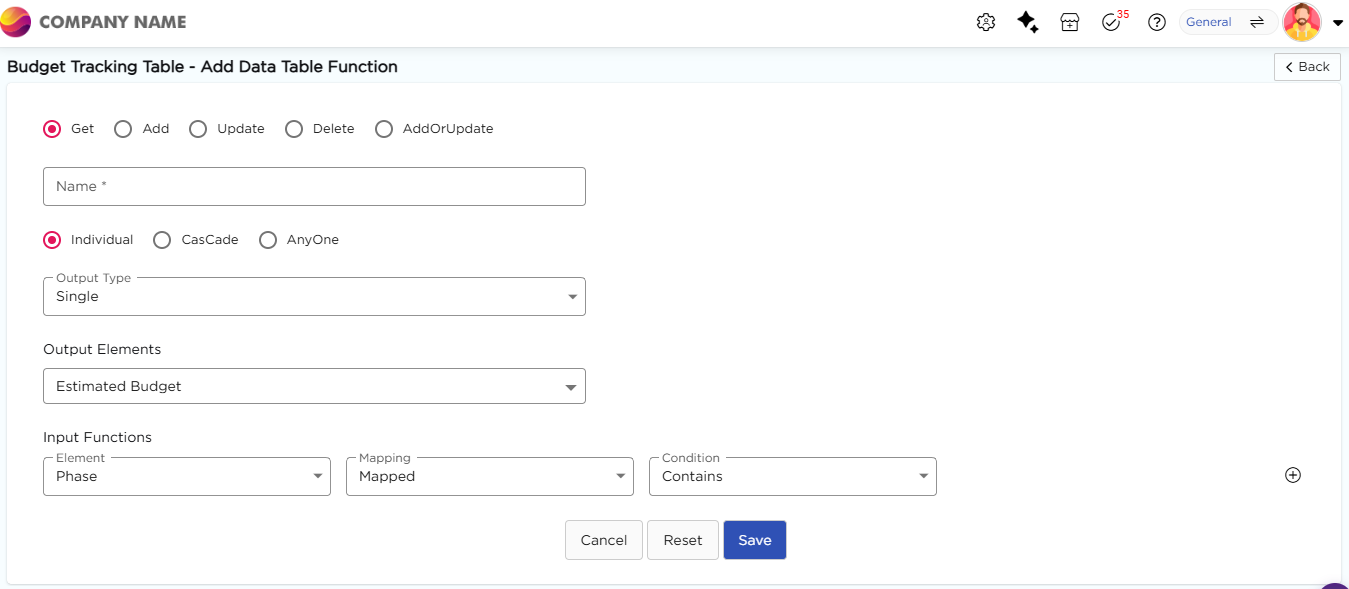
Mapping and Condition define when and how data is fetched from the data table based on input values. Once you select an input element, the Mapping and Condition fields appear.
¶ 1. Mapping
Mapping defines how the input value is evaluated. It has two values Mapped and Static.
¶ 1.1. Mapped
This option allows you to set the execution condition, and when the condition becomes true, platform will do the respective job of fetching the output values.
Example
If Employee ID is mapped and condition is Equal, the system fetches records where Employee ID matches the app input.
¶ 1.2. Static
This option allows you to set a definitive value on the go and when the definitive value matches the value provided in the app, the platform will do the respective job of fetching the output values.
Example
If Static value is set as "Active", the system fetches only records with Status = Active.
¶ 2. Condition
Condition defines the rule used to compare input value with data table value. Map the element to a condition from the drop down, or you can set a static value of what does it should consist of to proceed further. The Condition drop-down will have conditional values based on the selected field-type.
¶ 2.1. Text Field Conditions
If you select a Text field, you will have the below-given values.
| Contains | |
| Not Contains | |
¶ 2.2. Number Field Conditions
If you select a Number field, you will have the below-given values.
| Contains | |
| Not Contains | |
¶ 2.3. Date Field Conditions
If you select a Date field, you will have the below-given values.
| Contains | |
| Not Contains | |