Input Behavior controls how input fields work together when fetching data from a data table. It defines when the system should return output values based on user input.
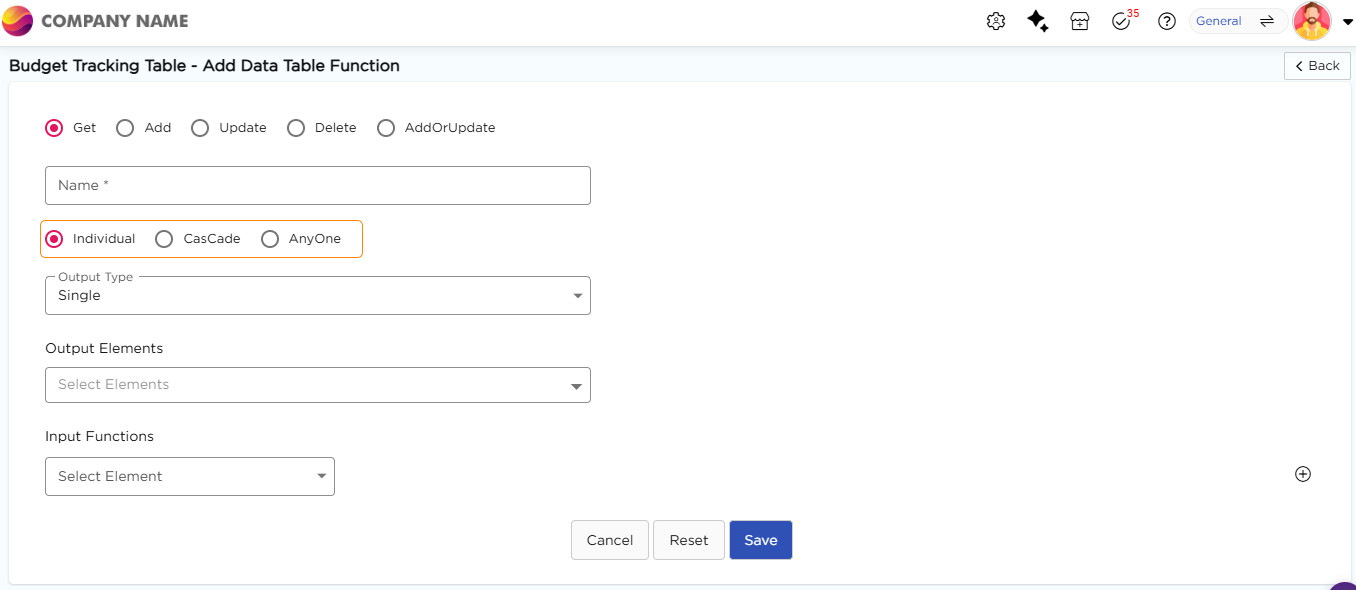
¶ 1. Individual
This option allows each input field to operate independently within the app, regardless of the number of available input fields. Users can interact with each input field to select values without relying on or validating against other fields. However, the output values corresponding to these fields will not be fetched until all input values have been selected.
Example
Consider an app for customizing a t-shirt. The app presents separate input fields for selecting the color, size, and material of the t-shirt. As users choose options in each field, the selections are displayed in drop-down menus. However, the final price of the customized t-shirt will not be shown until the user has selected values for all three fields (color, size, and material).
¶ 2. Cascade
Cascading dropdowns are like a chain reaction in your app's input fields. When you select a value in one dropdown, it triggers a series of changes in the next dropdowns. For example, let's say you have a dropdown for selecting a country. Based on the country you choose the next dropdown for selecting a city will only show cities from that country. This process continues for as many levels as you need. Importantly, once the selected value in the first cascade-based dropdown selection is changed, the rest of the cascading-based dropdowns related to the first one will be updated accordingly to the newly selected value.
Example
Suppose you have input fields for Continent, Country, and State in a sequence. If a user selects "Asia" in the Continent input field, the Country input field will load and display all countries in the Asia continent (such as India, Pakistan, Bangladesh, etc.). Similarly, if the user selects "India" in the Country input field, the State input field will load and display all states present in India.
¶ 3. Anyone
This option allows each input field to operate independently within the app, regardless of the number of available input fields. Users can interact with each input field to select values without relying on or validating against other fields. Importantly, the output values corresponding to these fields will be fetched even if only one input value is selected. As users continue to select additional input values, the specificity of the output values becomes more narrowed down.
Example
Suppose you have input fields for Department, Role, and Location.
If a user selects only "IT" in the Department field, the system shows all IT roles across all locations.
If the user selects only "Manager" in the Role field, the system shows all managers across all departments and locations.
If the user selects "IT" and "Manager", the system shows only IT managers.
If the user selects "IT", "Manager", and "Bangalore", the system shows only IT managers in Bangalore.