¶ FEATURE ENHANCEMENTS
¶ List Screen - Enhance data access feature in list screen
Description: User can give Data Access permission to the users when creating List Screen Data Source. Then user can get the data in the list screen based on the Data access given to the logged in user.
Benefits and Usage: User can get the list records based on the Data Access in the Data Source creation.
Usage:
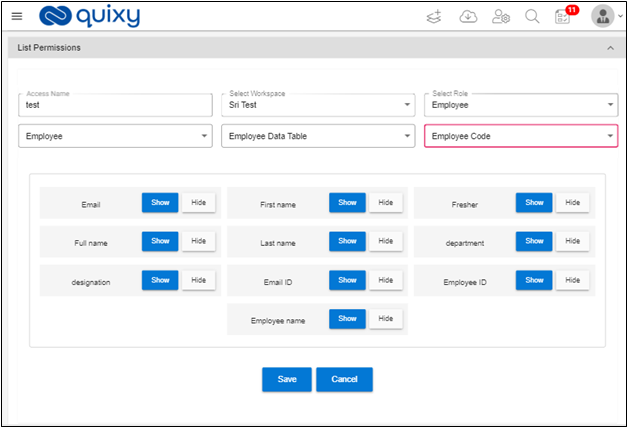
1. When Creating Data Source, in the List Permissions section do the following:
- Provide a valid Access Name.
- Select Workspace
- Select Role
- Click on Data Access drop down. Data Access drop down displays the following options.
- All
- Employee
- Employee Code
- Company
2. Select required Data Access from Data Access drop down. Access Collection drop down is displayed.
3. Access Collection drop down displays the list of collections in the data source.
4. Select the collection. Access Column drop down field is displayed. Select the access column.
5. The List Permissions page looks like below.
6. Click on Save button to save the Data source permission.
7. Data Source collection is saved.
8. Save the Data Source.
9. Click on the List from the menu.
10. Click on the List name. The List Screen displays the data based on the access given to the user.
¶ AD changes - Web Login Page Functionality
Web Login Page is displayed based on the Authorization type in organization.
Description: If Authorization type is local Active Directory, then Username Field is displayed instead of Email Id displayed email id for all accounts.
Benefits and Usage:
- Open Quixy Login page.
- If Authorization type is local, then Username Field is displayed instead of Email Id displayed email id for all accounts.
¶ Change Requests
¶ File Upload - Enhance File upload when adding record directly to the Data Table
Previously when adding record to the data table with file upload element .png file is not added to the data table.
Now we enhance the feature to add records directly to the data table with file upload element of .png and other file types.
Description: When adding records directly to the data table the file upload element, the file upload element accepts .png and other file types.
Usage:
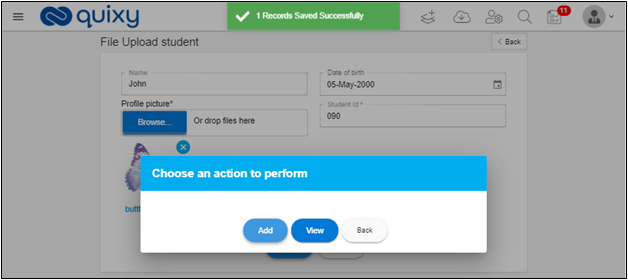
- Open Add Record page of Data Table and add record to the data table with file upload element.
- Save the Data table record then the record is saved and the page displayed as follows.
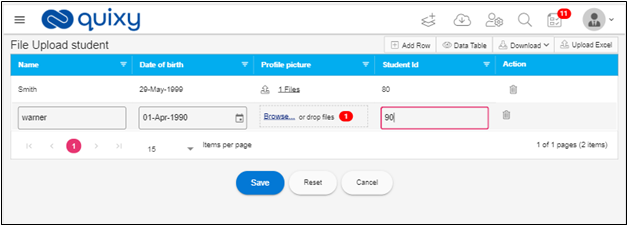
3. Open Add Multiple Records to the data table page and add record to the data table with file upload elements.
4. Save data table records then the data table is saved and the page displayed as follows.
¶ Calculate - Calculate Formula using Serial Number inside the Grid
Previously Calculate formula is not accepting serial number element.
Now we enhanced the Serial Number field inside calculate formula of the Grid.
Description: In Calculate Formula functionality of the grid element, it accepts serial number element.
Usage:
- Create a formula for the calculate element as follows.
- For example:
- Employee code: text element
- SNo: Serial Number element
- Employee Id: calculate Element
Create Calculate Formula as following:
Employee Id=Employee Code + SNo
¶ Users List Screen - Username changes based on authorization type
Previously User List Screen was not displaying the username field for if you log in with Local AD.
Now we change the User List screen based on the Authorization type if the Authorization type is Local AD, then Username field is added with the other fields
Description: Username field is added to the Users List, Edit User pages and Upload Excel, Download Excel Sample files if the authorization type is local AD.