Use the dashboard canvas to place dashlets, adjust the layout, and personalize the dashboard appearance. The placeholders below guide you in designing the dashboard.
¶ 1. Canvas Placeholders
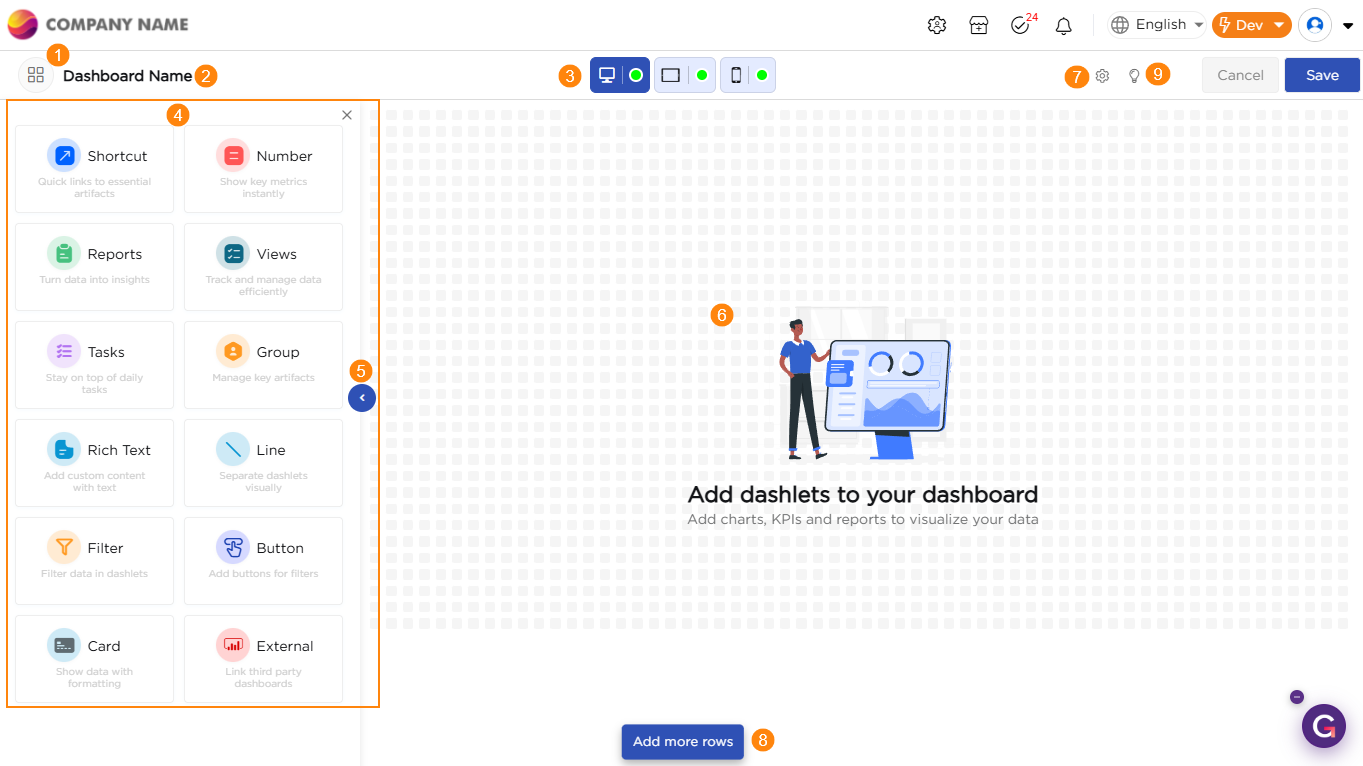
| # | Name | Description |
|---|---|---|
| 1 | Icon | Set an icon for the dashboard. |
| 2 | Dashboard Name | Provide a name for the dashboard. |
| 3 | Devices | Allows switching between Desktop, Tablet, and Mobile layouts. Each view can be configured separately. |
| 4 | Dashlets Panel | Shows all available dashlets that you can drag and place on the canvas. |
| 5 | Collapse Button | Hides or expands the dashlet panel to provide a larger working area on the canvas. |
| 6 | Canvas | The main workspace where dashlets are placed, arranged, and customized. |
| 7 | Dashboard Properties | Configure layout and appearance of the dashboard. |
| 8 | Add More Rows | Extends the canvas height by adding extra rows for placing more dashlets. |
| 9 | Best Practices | Guides you in choosing the right layout and settings for a better dashboard design. |
¶ 2. Dashboard Properties
These settings control layout, spacing, borders, and behavior of the dashboard.
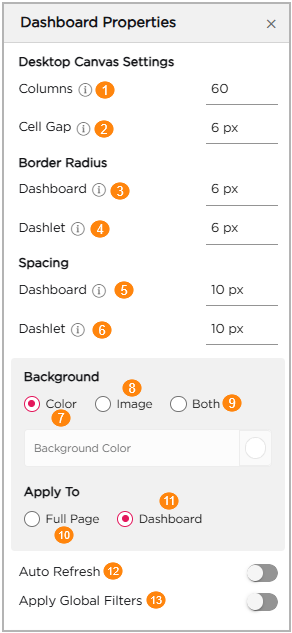
| # | Setting | Description |
|---|---|---|
| 1 | Columns | Sets the number of grid columns in the dashboard. Higher values give more precise placement of dashlets. |
| 2 | Cell Gap | Controls the space between dashlets on the canvas. |
| 3 | Dashboard Border Radius | Sets how rounded the corners of the dashboard background look. |
| 4 | Dashlet Border Radius | Sets how rounded each dashlet appears. |
| 5 | Dashboard Spacing | Adds padding between the dashboard edges and the content. |
| 6 | Dashlet Spacing | Adds padding inside each dashlet. |
| 7 | Background – Color | Applies a solid background color to the dashboard. |
| 8 | Background – Image | Lets you set an image as the dashboard background. |
| 9 | Background – Both | Uses both an image and a color overlay together. |
| 10 | Apply To – Full Page | Applies the selected background to the entire page. |
| 11 | Apply To – Dashboard | Applies the background only to the dashboard area. |
| 12 | Auto Refresh | Refreshes dashlets automatically at regular intervals. |
| 13 | Apply Global Filters | Applies global filters across supported dashlets. |