The button control in the form builder connects with Quixy’s back-end system, allowing users to modify or manipulate data within the app form before completing a transaction.
By working together with the back-end system, the button control enables advanced form validations and data manipulations that aren’t possible with business rules alone.
The following use cases show some practical examples of how the button control can be used, but it can be applied to many other scenarios as well.
USE CASES
1. In-app validation of Identity Documents such as Aadhaar Card, PAN Card, Driving License, etc.
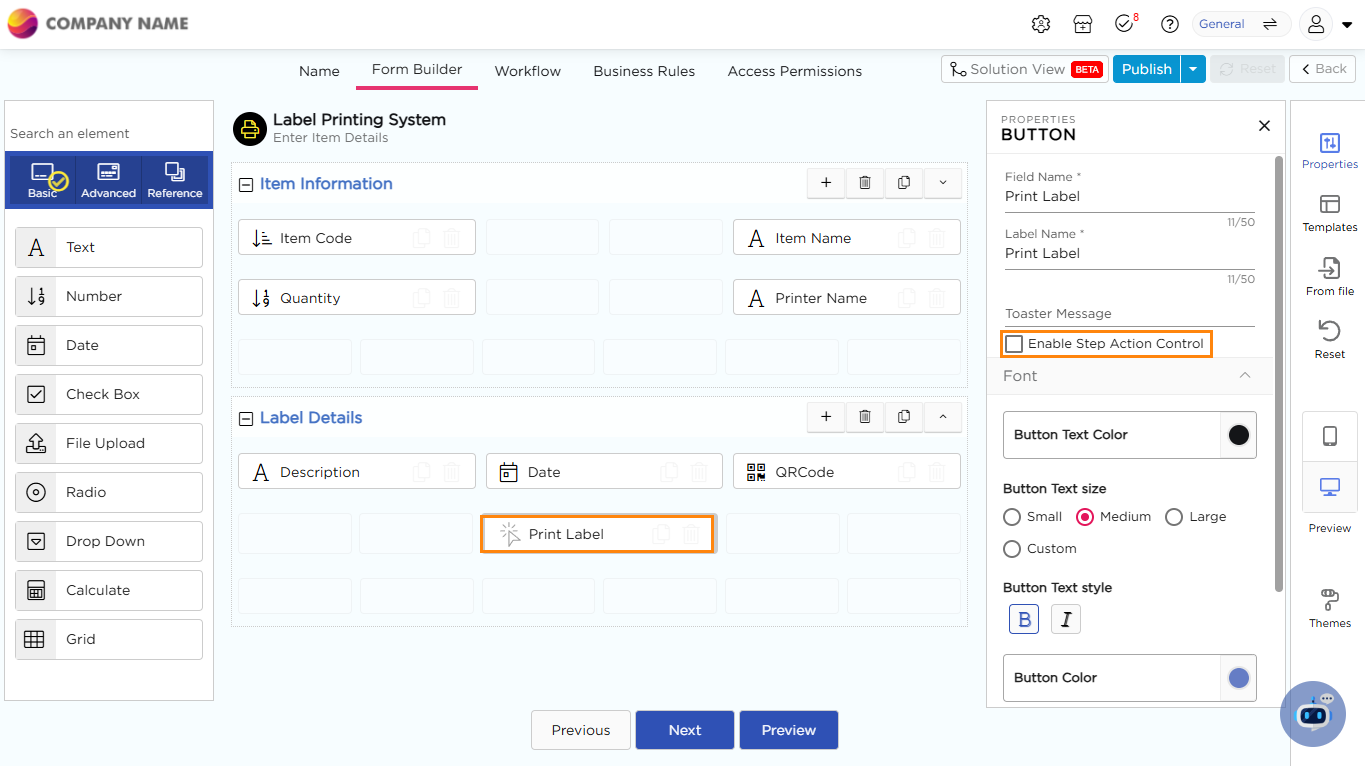
2. Imagine you have created a Label Printing System application in Quixy to simplify and speed up the process of generating labels. In this app, users can enter details such as Item Code, Quantity, Item Name, and Printer Name. Once the details are filled in, the user clicks the Print Label button.
- A Toaster Message immediately appears (e.g., “Label Sent to Printer Successfully”), confirming that the action has been executed.
- This gives users real-time feedback, reduces errors, and ensures that labels are generated only after all required fields are completed.
- The feature improves efficiency and accuracy, while also creating a smoother user experience.
¶ Button- Properties
- Field Name: Provide a unique name for the field which is visible for CDs while building application.
- Label Name: Provide a unique name for the field which will be visible for the end-users.
- Toaster Message: Displays a brief notification or confirmation message when the button is clicked. (e.g., “Label Printed Successfully”).
- Enable Step Action Control: If you check this box, the button will only work when certain steps are completed first. This ensures that actions happen in the right order. For example, if you're filling out a form and need to enter all required details before submitting, enabling this option will make sure you can't click the button until everything is done correctly.
¶ Field Themes
Font Properties-Button
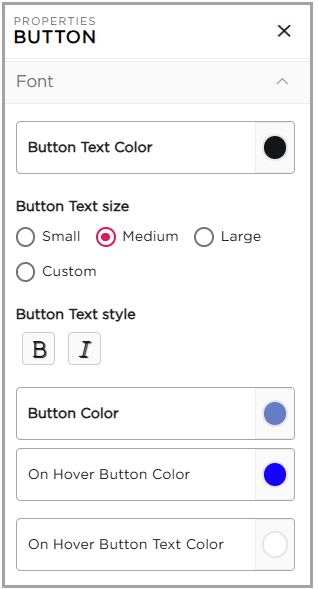
- Button Text Color: Customize the color of the text displayed on the button.
- Button Text Size: Adjust the text size on the button by choosing from Small, Medium, Large, or a Custom size.
- Button Text Style: Change the button text style to Bold or Italic with a simple click.
- Button Color: Set the background color of the button to match your design.
- On Hover Button Color: Choose the background color that appears when the mouse pointer hovers over the button.
- On Hover Button Text Color: Select the text color that will display when the mouse pointer hovers over the button.